

CactusVPN is a small VPN provider that claims to help you hide your IP addresses, bypass geo-restrictions, and browse anonymously. But doesn’t every other provider do that? So, I took time to scratch the surface and find out what makes CactusVPN tick.
A key selling point of the VPN is its Smart DNS feature that helps you unblock 340 global streaming sites. It should also help access blocked content when in China.
I love the fact that it takes your security seriously. It has features such as military-grade AES-256 encryption, DNS leak protection, a kill switch, and an app killer. But, the VPN has a questionable no-logs policy that makes me wonder whether it’s safe to give this VPN provider my personal information.
A great thing about Cactus VPN is that it’s compatible with all major operating systems, including Windows, macOS, iOS, Android, and multiple routers. You can also connect an unlimited number of devices simultaneously, including your Amazon Firestick and Android TV.
You can try out the reasonably-priced VPN using its 3-day free trial. Better yet, you can use a wide range of payment options, including cryptocurrencies, which helps with anonymity. After compiling this comprehensive data-driven review, I recommend these VPNs with a better server network and immense global coverage.
Try Out CactusVPN Risk-Free For 3 days Today!
Short on Time? Here Are My Key Findings
- Only unblocks Netflix and most streaming sites using the Smart DNS feature. Find my tests on streaming here.
- Boasts consistent speeds with minimal lags, which is good for torrenting, gaming, and streaming. Here are my speed test results.
- Has a limited server coverage of 39 spread across 25 countries with a majority in Europe. Find more info about its server network here.
- Has advanced security features, including a kill switch, an app killer, DNS leak protection, and 7 protocols. I dug deep into its security features here.
- Claims to have a guaranteed no-log policy; thus, it doesn’t keep information about your traffic logs, browsing history, or connection logs. Have a deeper look at its privacy policy here.
- You can download CactusVPN on Windows, macOS, Android TV, Amazon Fire TV, and routers. Find the compatible devices here.
- Torrenting is limited to only 6 servers, all located in Europe. Read more about torrenting on CactusVPN here.
- Reasonably priced with a rather complex pricing offer. It has four main offers with 5 smaller offers for specific uses. Take a look at the pricing packages.
- Customer support is lightning-fast with professional answers. It has a live chat and a comprehensive learning center. Here are more details about its customer service.
[features-overview-table]
Streaming — Unblocks Netflix and Most Major Streaming Sites
CactusVPN allows you to stream from Netflix libraries in the US, the UK, and Australia; BBC iPlayer; Hulu; Disney+; HBO NOW; Amazon Prime Video; Roku; and YouTube.
Other sites that you can also access using Smart DNS include NBC, NBC Sports, BBC Sport, BBC Bitesize, ITV Player, CBS, CNNgo, and almost every other popular streaming site that is out there.
I couldn’t unblock Netflix, Hulu, or Amazon Prime video on CactusVPN’s normal servers — I could only stream using its Smart DNS service. Smart DNS on CactusVPN changes your DNS to make it look like you’re in another country, which helps you unblock streaming sites from the US, Germany, Sweden, France, the UK, Russia, and Italy.
However, it doesn’t change your IP address or encrypt your data. I was concerned about using smart DNS at first because it meant that my browsing activity wasn’t protected, so I only used smart DNS for streaming and not for torrenting or regular browsing. I was impressed by the feature since I could stream from Netflix US as a live news report on CNN ran in the background.
Unblocked: Netflix and Amazon Prime Video
Since I wanted to have a feel of streaming using CactusVPN, I subscribed to its VPN + Smart DNS package. I unblocked Netflix US when connected to its server in Los Angeles. I watched Atypical from the Netflix US library without any lag or buffering.
I also ran 6 more tests and unblocked Netflix libraries in the UK, Australia, and Japan without any problems.
However, every time I connected to the Smart DNS feature, I would lose my internet settings. This feature was tampering with the DNS settings on my laptop. I found this annoying because I had paid extra for the service.

A screenshot of Atypical on Netflix
I unblocked YouTube when connected to its server in Los Angeles. I didn’t experience any buffering as I watched the latest episode of America’s Got Talent.

A screenshot of America’s Got Talent on YouTube
Blocked By: Hulu, HBO Max, Disney+, and BBC iPlayer
I tried to log into HBO Max when connected to a server in Manassas, but it didn’t work. I was met with an error page instead. I even changed to a server in the UK, but a similar message appeared stating that the service wasn’t available in my location.

Error message from HBO Max
I also failed to stream an episode of Baptiste on BBC iPlayer when connected to its London server. Every time attempted to log in, iPlayer blocked me and displayed an error.

An error message when trying to log into BBC iPlayer
I connected to the Los Angeles server, but Hulu blocked my attempts to log in. I didn’t bother to log into Disney+ and ESPN since they belong to the same parent company as Hulu, so they use the same VPN blocks.
While CactusVPN claims that using smart DNS is a plus, I didn’t enjoy the service due to the technical issues I experienced during my tests.
Speeds — Decent Speeds
CactusVPN’s speeds are fast enough for browsing, streaming, and torrenting. I tested CactusVPN’s speeds using the OpenVPN protocol. Before I started, I tested my base speeds without the VPN to see if I lost any speed.
I am in Nairobi, Kenya, and my baseline speed was 3.5 Mbps (download), 3.5 Mbps (upload), and 37ms (ping) without a VPN connection. I first connected to a nearby server and then tested the speed when connected to international servers. I tested 10 of its servers, and at most, I lost 24% of my original speed.
| Server Location | Download speed (Mbps) | Upload speed (Mbps) | Ping (ms) |
| Nairobi | 3.45 (2% loss) | 3.42 (2% loss) | 85 |
| US Manassas | 2.82 (19% loss) | 2.84 (18.8% loss) | 250 |
| US New York | 2.82 (19% loss) | 2.90 (17% loss) | 265 |
| US Los Angeles | 2.91 (16.8% loss) | 2.81 (19% loss) | 330 |
| UK | 2.75 (21% loss) | 2.87 (18% loss) | 270 |
| Netherlands | 2.94 (16% loss) | 2.86 (18% loss) | 322 |
| Germany | 2.87 (18% loss) | 2.90 (17% loss) | 199 |
| India | 2.73 (22% loss) | 2.78 (20% loss) | 336 |
| Hong Kong | 2.66 (24% loss) | 2.75 (21% loss) | 350 |
| Australia | 2.86 (18% loss) | 2.81 (18.8% loss) | 380 |
| Japan | 2.79 (21% loss) | 2.74 (20% loss) | 340 |
I also tested 3 servers with the Smart DNS feature, and there was a minimal loss in speed. I was impressed with the consistent speeds I got across all servers, even on far-away servers that are often slow.
On the downside, CactusVPN advocates for the AES-128 encryption that has faster speeds. However, this encryption is less secure than the AES-256 encryption. It seems the platform sacrifices a little security for speed.
Are CactusVPN’s Speeds Fast Enough for Gaming? Yes
CactusVPN has fast speeds when playing online games, especially on the local servers. However, due to the high ping on most of the servers on the network, it may prove impossible to play some online games.
I played a game of Dragon City when connected to its server in Germany. While the connection dropped a couple of times, I didn’t experience considerable speed loss when playing.

Playing Dragon City using CactusVPN
Server Network — Limited but Stable
CactusVPN has a limited server network of 37 IP addresses, with 39 servers in cities spread across 25 countries in America, Europe, and the Asia Pacific. This gives you a good selection of locations, so chances are there’s a server in the country you want to unblock content from. I connected to 5 of its servers in the US, and they remained stable throughout my browsing.
| Server Location | Countries/ Cities |
| America | US (New York, Los Angeles, Seattle, Chicago 一 2 servers, Dallas, KansasCity 一 2 servers, Manassas), Montreal (Canada) and Franca (Brazil) |
| Europe | UK (London 一 4 servers), Netherlands (Amsterdam 一 6 servers), Switzerland (Zurich), Spain (Barcelona), Latvia(Riga), Romania (Iasi), Italy (Ponte San Pietro), Portugal (Tomar), France (Paris), Poland (Warsaw), Russia (Moscow), Sweden (Stockholm) |
| Asia Pacific | Hong Kong, Australia (Sydney), Japan (Nagano), Singapore, India (Faridabad), Malaysia (Kuala Lumpur) |
CactusVPN leases all its servers instead of owning them (it’s the common trend in the industry). You get a static shared IP address. This means that many people are using the same IP address as you, and nobody can tell who is accessing which websites, which means nobody can trace activities back to you.
6 of the servers on the VPN are labeled P2P and are all in Europe. You can sort the servers based on speed from the client area on the app, which helps pick a dependable server. I found that the fastest server was the P2P one located in Amsterdam.
Information about the load on each server is available on the client area server list. This information helps you know the percentage number of people using each server, enabling you to avoid overcrowded servers that may be slow during peak hours. I went for the UK server that showed a load of 2% and was impressed with the speed I got.
Switching between the servers is fast and easy. I connected to servers in different cities and found the speed decent enough for everyday browsing and streaming even HD videos. I also didn’t experience any connection drops.
There were lags during peak hours since there was overcrowding on the few servers on the network. To solve that, CactusVPN advocates for you to connect to its Smart DNS feature, which doesn’t depend on the servers but works by altering your DNS. I tried this, and it worked.
Security — Solid Security Features
CactusVPN is very secure. It has military-grade security features, including 256-bit AES encryption, SHA256 authentication, 2048-bit DHE-RSA key exchange, making your browsing history completely unhackable. The encryption prevents your ISP and government from tracking your online activity and keeps you safe from hackers by scrambling any text you send or receive. I felt safe using CactusVPN because this is the highest level of encryption available.
It has Perfect Forward Secrecy (PFS), which ensures that you are assigned a different encryption key for every new session you start. So, if a hacker were to get hold of your encryption key, they’d only be able to see what you did during one session and not all of the activity you’ve done on the VPN. I don’t think this is an important feature when I’m streaming; it’s vital for torrenting and sending sensitive information.
You can choose from 7 protocols; OpenVPN (TCP & UDP), SSTP, SoftEther, IKEv2, L2TP/IPSec, PPTP, and WireGuard. With these many protocols, you can choose how to route data and customize your connection based on your needs.
I prefer OpenVPN since it’s highly secure, with a minimum of 128-bit encryption. Because many third parties audit it, it has no faults for hackers to exploit. OpenVPN is an excellent go-to protocol because it is very secure, and you don’t have to worry about a complicated setup process. I found it to be stable and easy to set up.
You can use IKEv2 when experiencing sluggish connections since it’s faster than the other protocols. CactusVPN provides a detailed guide on the available protocols in the FAQ section on its site, which makes it easier for you to choose a protocol based on the activity you are doing. I found the guides easy to understand.
I was glad to learn that CactusVPN supports WireGuard on all its apps. WireGuard is a newer protocol that gives you the same security as OpenVPN but with faster speeds. I connected to it and was impressed by the fast speeds I got.
Unfortunately, I experienced DNS leaks on all the servers when I enabled my Smart DNS feature. DNS leaks occur when your data isn’t encrypted or when the VPN reveals information about your IP address. Such a leak is terrible since it exposes you to unwanted scrutiny, and anyone can easily intercept your data. I was glad to learn that I could fix it by turning the DNS leak protection toggle on my settings. I feel that CactusVPN should turn the leak protection by default to protect your security.
CactusVPN doesn’t provide any protection against IPv6 or WebRTC leaks. Without such protection, you’re vulnerable, which nullifies the purpose of using a VPN. The VPN recommends using third-party providers to prevent such leaks.

DNS leak protection toggle on CactusVPN app
Additionally, its app has a kill switch that disconnects you from the internet when your connection drops. That way, your actual IP address is always secure. However, you will need to activate the kill switch using a toggle on the app’s settings. The process takes only a few seconds and can save you from revealing your identity. I got temporarily disconnected when using this VPN, but the kill switch kicked in, protecting me from leaks.
Like the kill switch, CactusVPN has an ‘app killer’ that lets you select the apps you would like closed if your VPN connection drops. You can choose the programs you want the app to close by clicking on the app killer button on the top far right of the app. It’s helpful since you won’t lose access to the internet on your browser while you await reconnection. I lost my VPN connection, but I could still access several sites that I hadn’t included to be closed by the app killer.
It has a TCP Port 443 that reroutes all incoming connections to bypass firewalls. This helps mask using a VPN when browsing HTTPS sites. Using Port 443 helps encrypt sensitive information such as your bank details to prevent anyone from intercepting it. I felt safe sharing my credit card details when paying for the VPN due to this feature.
CactusVPN has split tunneling, which is a feature that allows you to route some of your traffic through an encrypted VPN tunnel and the other through the open network. You can use this feature to protect sensitive information using the VPN while still accessing. your local network devices. You will also save some bandwidth since unencrypted data travels faster. I activated the split tunneling feature and accessed my bank’s website, which usually doesn’t work when a VPN is on.
I also ran a quick scan of the VPN on VirusTotal to check for viruses or malware. After several hitches, it passed. No vendors flagged the VPN as malicious.

CactusVPN results on VirusTotal
Privacy — Questionable
CactusVPN has a questionable privacy policy with major red flags when it comes to the privacy of your personal information.
CactusVPN is in privacy-friendly Moldova, which is a good step towards protecting your privacy. The Eastern European country isn’t part of the 5/9/14 Eyes Alliance; therefore, you don’t have to worry about government surveillance.
Better yet, Moldova isn’t part of the European Union (EU) or data sharing groups such as SIGINT. Moldova has pro-consumer legislation on data protection, which means there’s no legal requirement for VPNs to log your information.
CactusVPN also claims that it has a guaranteed no-logs policy. Such a policy means that it doesn’t track, collect or store any of your information, including IP addresses, traffic logs, DNS logs, and connection timestamps. It also doesn’t keep records of any metadata of your connections, whether hashed or anonymized. This way, third parties can’t use such information to identify you.

An excerpt of CactusVPN’s privacy policy
It worries me that CactusVPN doesn’t audit its network, which makes its guarantee suspicious since there’s no verified evidence that it’s doing everything it claims.
On the downside, CactusVPN stipulates in its privacy policy that it holds the sole discretion to hand over your personal information to law enforcement when the situation arises. That’s not comforting since the VPN collects your email during registration and other personal details when making payments.

A section of CactusVPN’s privacy policy
CactusVPN accepts cryptocurrencies such as Bitcoin and altcoins. This is an excellent option if you want to remain anonymous when making payments. I paid for my one-month purchase using Ethereum, and the process was hassle-free.
Torrenting — Limited
CactusVPN allows torrenting but limits it to 6 servers on the network.
These servers are in the Netherlands, Germany, Switzerland, Spain, Latvia, and Romania. Each of the torrenting servers is clearly labeled P2P on the app.

The P2P servers are clearly labeled
Since all the torrenting servers are in Europe, you may experience lags and connection instability if you are far away from them. There’s also overcrowding on the servers since they are so few. I connected to their P2P server in Germany and was impressed with how fast I torrent large files.
CactusVPN has torrent-friendly features such as a kill switch, no-logs policy, and DNS leak protection which help ensure your anonymity when torrenting. However, before torrenting, you have to configure the DNS leak protection feature. It should have that active by default!
Unfortunately, I felt that torrenting is expensive on CactusVPN. Only 2 of its packages allow P2P, so you will have to pay more to torrent.
Does CactusVPN Work in China? Yes
CactusVPN’s support confirmed that the VPN works in China, even though it doesn’t provide that information on its website. The network uses obfsproxy, a technology that changes the way your online traffic flows by adding encryption around the said traffic. Therefore, you can safely unblock content in censored regions since the obfsproxy will make ISPs or governments think it’s regular harmless HTTP traffic. I contacted support to find out if the VPN works in China, and they confirmed that it does.

CactusVPN’s customer service response
There’s also a detailed guide on manually setting up the SoftEther Protocol, which helps those using it bypass the Great Firewall of China. However, you need to download and install it before you travel to China to avoid inconveniences when trying to do it from there.
Simultaneous Device Connections — Unlimited
You can connect an unlimited number of devices under a single purchase on CactusVPN. That’s welcome news since most VPNs limit the number of devices that one can connect to simultaneously. That’s fantastic since you get value for money, especially if you have a family with many devices.
To confirm this, I contacted support, and they confirmed that the VPN allows unlimited simultaneous connections. Further, I connected my phone and PC simultaneously, and they both worked without any lags or connection issues.
Device Compatibility — Compatible with Many Devices
CactusVPN works on Windows, macOS, Android, iOS, AndroidTV, Amazon Fire TV, a Chrome extension, and a Firefox extension. You can also manually set up the VPN on Ubuntu, Chromebook, Safari extension, and Boxee Box.
By configuring the VPN to connect with a router, it becomes possible to utilize gaming consoles such as PlayStation 4, Xbox One, and Nintendo Switch. Additionally, the VPN is compatible with Roku, Apple TV, Chromecast, and the Tor browser. To personally assess its functionality, I tested the VPN on my PS4 and enjoyed my favorite Spotify playlist while playing God of War.
- Windows 一 The VPN is compatible with any device using Windows Vista and above. You will find detailed setup tutorials on its website on installing the VPN on your Windows device. It took me a few seconds to install the app, and I found it easy to use.
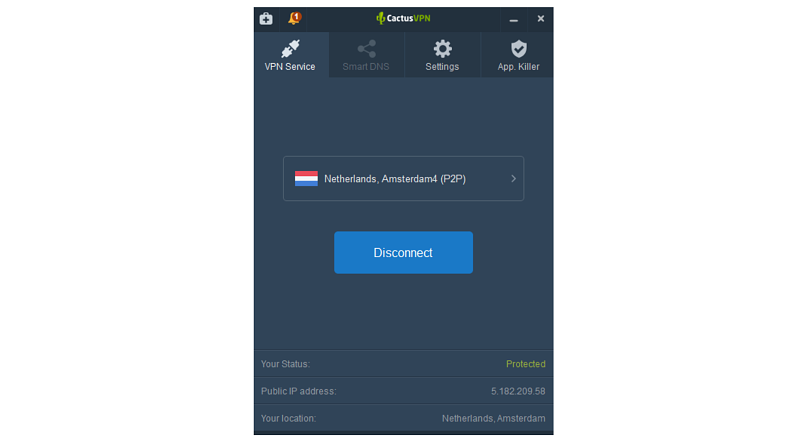
The layout of the CactusVPN Windows app
- macOS 一 The app for macOS is similar to the one for Windows. You can easily download apps for macOS Version 10.11 (El Capitan) or newer. Those using older versions may need to install the app manually.
- iOS 一 You can find the CactusVPN app for your iPhone or iPad on Apple Play Store. The app is easy to use and straightforward to install.
- Android 一 CactusVPN is compatible with Android devices. You can easily download and install the app from Google PlayStore.
- Android TV 一 You can also use the VPN on your smart TV since it’s compatible with Android TV. The setup is easy and fast.
- Amazon Fire TV 一 You can download a CactusVPN for your Amazon Fire TV from its website. The process takes seconds.
- Browser extensions 一 You will also find apps to use on your Chrome or Firefox browser extensions. There’s a detailed set-up tutorial on its website for both extensions. Unfortunately, there’s no app available for the Safari extension.
- Routers 一 You can also configure routers to connect to the VPN. It’s compatible with DD-WRT, ASUS, MikroTik, D-Link, T-Link, Linksys, Tomato, Tenda, and OpenWRT routers. You can find a detailed guide on setting up each of these routers, including configuring various protocols on them.

Final Verdict
I recommend CactusVPN to anyone looking for a provider with fair prices and advanced security features.
While its server network is limited, the VPN is compatible with many devices. Better yet, you can connect an unlimited number of devices simultaneously under one purchase.
I was impressed with the VPN’s professional customer support, which was lightning-fast in responses and helpful information. Its set-up tutorials are useful and easy to follow.
Its most significant selling point was the ability to unlock over 340 websites using the Smart DNS feature.
However, the VPN should work on its refund policy since it’s too conditional and rigid. Also, a more customer-friendly privacy policy wouldn’t hurt!
FAQs
Is CactusVPN safe?
Yes. It has military-grade security features, 7 protocols, including WireGuard, a kill switch, and an app killer for improved safety.
Can CactusVPN unblock Netflix?
Yes. You can only unblock Netflix with its Smart DNS feature that comes at an extra price.
Will CactusVPN slow my speeds down?
No. CactusVPN has consistent speeds that are ideal for browsing, streaming, torrenting, and gaming.